


Quick overview:
Windows 2000/XP/2003 kann bis zu 4 GB an Arbeitsspeicher ansprechen, wobei hier in zwei Bereiche eingeteilt wird: Der erste Teil (Bis zu 2 GB) ist für Programme bzw. laufende Prozesse angelegt während der zweite Teil (Ebenfalls bis zu 2 GB) lediglich für das "Herz" von Windows, den Kernel, erstellt wird. Letzterer bleibt, egal wieviele Anwendungen geöffnet sind, aktiv bei seiner Größe und Reservierung. Er teilt sich auf in "Auslagerungszuweisungen" und "Kernel-Stapelzuweisungen".
Paging allocations: These are allocations in memory where the kernel processes (basic drivers, processor control, etc.) are stored. On terminal servers, this allocation is utilized by many simultaneous logins.
Kernel stack assignments: Space is created here for each process (also known as a thread) that accesses the kernel or controls the system.
"Page assignments" take place in the "Paged Pool Area" (special area for swapping), while the kernel stack assignments are in the "System Page Table Entry (PTE)" area. This special division takes place at system startup. However, if large processes (file and memory operations for complex programs) run via the SPTE area and this is exceeded, there is a risk of crashes. This is due to the fixed size, which cannot be expanded dynamically or taken from the "managed pool area". As the swap allocations are more important for servers, we can give the page table entries more importance by increasing the size. This means that there are still enough stack allocations available even for large file and storage operations.
Consequence: Performance increases and sources of error decrease! This is how you proceed to set the number of PTEs to the maximum:
1. Click Start/Run and type regedit to get to the Windows registry.
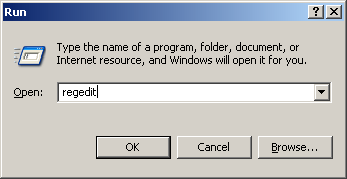
2. Navigate to the key HKEY_LOCAL_MACHINE\ SYSTEM\CurrentControlSet\Control\Session Manager\Memory Management and double-click on SystemPages.
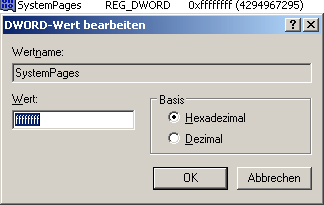
3. Enter 8xF (ffffffff) under Value, which instructs Windows to use the maximum number of PTEs.
After a restart, the new memory management is active and you can look forward to new performance for extremely complex applications!

On Windows Tweaks you will find time-saving tech guides for PC, software & Microsoft. For a stress-free digital everyday life. Already We have been tweaking Windows since 1998 and just don't stop!
