


Quick overview:
The first file on a hard disk that works with the NTFS file system is the MFT (Master File Table). It contains all information about all files and folders on the data carrier: file size, file creation and last modification dates, shares, content and file type. Unfortunately, the size of this important system file is limited, which slows down access to the files and folders, as the older information has to be deleted again and again and then re-entered later - which understandably costs computing time. This is equivalent to hard disk fragmentation. So if you have a lot of files on your computer, I recommend enlarging the MFT. Unfortunately, this trick does not work on FAT hard disks, as it would be pointless here due to the different system.
1. Click on Start/Run and type regedit in the command line.
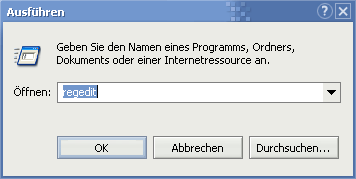
2. After confirming with Enter, you will find yourself in the editor for the Windows registry database. Double-click to navigate through the keys HKEY_LOCAL_MACHINE\SYSTEM\CurrentControlSet\ Control\FileSystem.
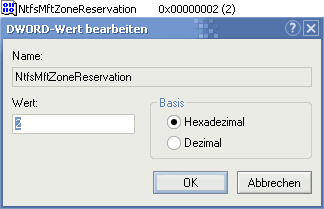
3. You can already see some entries in the right-hand pane. Now click on a free area here and select New > DWORD value. Now name this NtfsMftZoneReservation. Now double-click on NtfsMftZoneReservation and enter a number for the desired setting in the pop-up window:
1 = 12.5% of the data carrier
2 = 25% of the data carrier
3 = 37.5% of the data carrier
4 = 50% of the data carrier
The larger the MFT, the lower the chance of fragmentation, although memory consumption can of course also increase.

On Windows Tweaks you will find time-saving tech guides for PC, software & Microsoft. For a stress-free digital everyday life. Already We have been tweaking Windows since 1998 and just don't stop!
