


Quick overview:
Ein Absturz ist oftmals bei der Millennium Edition von Windows nicht zu vermeiden und so wird jeder verärgerte User sich auf die umständliche Prozedur gewöhnt haben, dass beim fehlerhaftem Herunterfahren des Rechners das Festplattenüberprüfungsprogramm sich meldet und alle Daten einem gründlichen Check unterzieht ob alles ordnungsgemäß ist.
However, especially on faster computers with IDE hard disks (and these are most of them nowadays), this can lead to considerable difficulties under certain circumstances, as Windows cannot empty the cache in which important data such as your own files or system parts are located in time. And this is how you solve this problem:
1. Klicken Sie auf diesen Link um sich den offiziellen Patch von Microsoft bezüglich dieses Fehlers herunterzuladen. Nachdem der Download beendet ist genügt ein Doppelklick und das ScanDisk Problem ist endlich Geschichte.
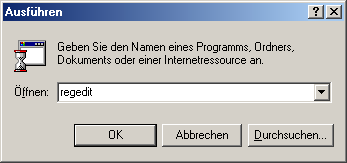
2. If this is still not the case, you must set the time in which Windows writes the files to the hard disk yourself so that there is enough time for the backup. To do this, click on Start/Run and enter regedit.
3. Now navigate through the Windows registry to the path HKEY_LOCAL_MACHINE\SOFTWARE\Microsoft\Windows\CurrentVersion. Here, right-click in the right-hand pane and select New/DWORD value.
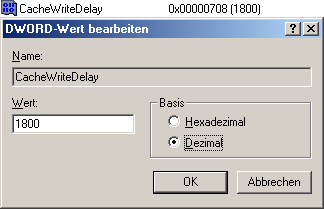
3. Name this newly created value CacheWriteDelay and double-click on it. Now select Decimal and enter 1800, which gives the computer 1800 milliseconds, which is the best value based on our own experience.
Restart your computer now - you will find that you have got rid of the annoying check once and for all and the risk of something happening has been greatly reduced.
NOTE FOR NEW PUBLICATION:This article was produced by Sandro Villinger and comes from the Windows Tweaks archive, which has been built up since the late 1990s.

On Windows Tweaks you will find time-saving tech guides for PC, software & Microsoft. For a stress-free digital everyday life. Already We have been tweaking Windows since 1998 and just don't stop!
