


Quick overview:
Dank den vorangegangenen Tipps haben Sie schon ihre Internetverbindung via Modem oder ISDN perfekt eingerichtet. Jetzt erfolgt nur noch die Wahl des korrekten Anbieters und die Verbindung über ihren. Meistens helfen ihnen Zeitschriften wie CHIP oder ComputerBILD dabei den korrekten Provider herauszufinden. In vielen Fällen stehen sogar direkt der Benutzername sowie das Passwort dabei. Andererseits können Sie sich bei einem großen Anbieter anmelden, welcher ihnen dann diese Daten bequem per Post zuschickt. Und so wenden Sie diese an:
1. Klicken Sie in der Systemsteuerung auf DFÜ-Netzwerk und wählen Sie sofort Neue Verbindung erstellen.

2. Tragen Sie in die Zeile Geben Sie den Namen für den angewählten Computer ein nun eine beliebige Bezeichnung ein und wählen Sie unter Gerät nur noch ihr bereits installiertes Modem/ISDN Gerät.
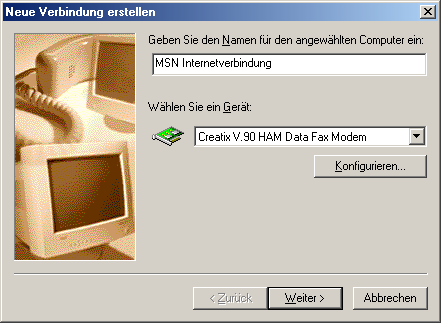
3. Nachdem Sie auf Weiter geklickt haben, müssen Sie nur noch die Rufnummer ihres Anbieters eintragen und wiederum mit Weiter fortfahren.
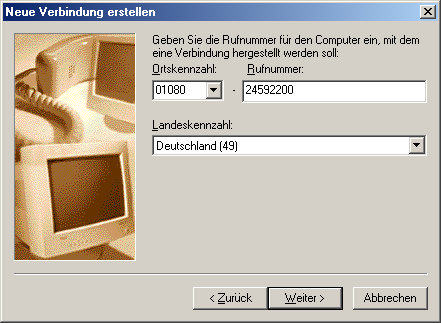
4. Ein Klick auf Fertig stellen übernimmt alle Einstellungen und generiert ein neues Symbol, welches Sie ab sofort für die Verbindung benutzen können.
5. Doppelklicken Sie nun darauf und tragen Sie unter Benutzername sowie Kennwort die jeweiligen Daten, die Sie von ihrem Anbieter erhalten haben ein und klicken Sie auf Verbinden. Wenn alles geklappt hat, sind Sie zum ersten Mal im Internet.
Nun da Sie damit fertig sind können Sie gleich mit dem nächsten Schritt auseinandersetzten: Die besten und grundlegenden Treiber für ihr System suchen und installieren.
NOTE FOR NEW PUBLICATION:This article was produced by Sandro Villinger and comes from the Windows Tweaks archive, which has been built up since the late 1990s.

On Windows Tweaks you will find time-saving tech guides for PC, software & Microsoft. For a stress-free digital everyday life. Already We have been tweaking Windows since 1998 and just don't stop!
