


Quick overview:
Even in this day and age, DOS is hard to kill off. Classic games in particular still demand this original operating system. This is not unknown to fellow users in particular, which is why you should give them a run for their money if you want to try out a game or two.
For each tip, there is a single step that you must perform beforehand:
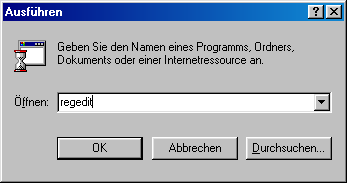
1. Click on Start/Run and type regedit. The registry editor will appear and you will see a directory structure similar to Explorer.
2. Double-click through the keys HKEY_LOCAL_MACHINE\Software\Microsoft\Windows\CurrentVersion\Policies one after the other. This last Policies folder should have the subfolder System, which you mark.
.
If this does not exist, select Policies and right-click on it. Select New/Key and name it WinOldApp.
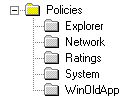
3. Now switch to WinOldApp so that you can see its content. The right-hand pane now contains all the values described below. Here is an example:

Disable the option Start computer in MS DOS mode
When you click Shut down in the Start menu, you have the option of closing Windows and switching to classic DOS, which you can block in the following way:
If you click in the right-hand pane of WinOldApp, under the registry path mentioned above, and then select New/DWORD value, a new value will appear, which you name NoRealMode. Now double-click on this value and enter a 1 in the command line. Once the value has been created, Windows will no longer shut down.
Disable the MS DOS command prompt
You can also conveniently disable the execution of DOS programs under Windows.
Click in the right-hand pane and select New/DWORD value. Now name this Disabled and double-click on it. After you have typed in 1, MS DOS will remain disabled.
NOTE FOR NEW PUBLICATION: This article was produced by Sandro Villinger and comes from the Windows Tweaks archive, which has been built up since the late 1990s.

On Windows Tweaks you will find time-saving tech guides for PC, software & Microsoft. For a stress-free digital everyday life. Already We have been tweaking Windows since 1998 and just don't stop!
