


Quick overview:
The swap file is the lifeblood of Windows. It steps in as a useful helper when the working memory is running low. This can be caused by having many complex applications or games open at the same time. If you do not adapt this file to your personal requirements, you are wasting the performance potential of your computer. A poorly configured swap file slows down the system with unnecessary computing work. There is a rumor on the Internet that every swap file must be three times as large as the working memory, as warp speed. I have researched this topic intensively.
How to set the swap file:
1. Right-click on "Workplace" and select the entry "Properties" from the context menu that pops up. Now navigate successively through "Advanced" > "System performance options" > "Change" until you are finally faced with the following window:
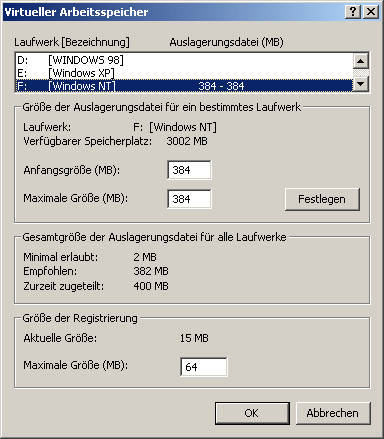
2. You are now faced with selecting the hard disk on which the swap file should be located. If you have several hard disks in your computer, you should always use the faster one to ensure fast access to the file in the event of storage bottlenecks. You can find out more about hard disks and their speed here.
You will notice that Windows has already selected a setting itself, as certain values can already be found under Initial size and Maximum size. However, this is not exactly optimal, as the dynamic enlargement or reduction of the swap file requires more computing time. I therefore recommend entering the same values in megabytes in both fields.
Example: 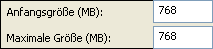
3. Now let's move on to the optimum size for your system. You need to think carefully about which of the three profiles you belong to.
Standard users: They mainly use the computer to work with office programs such as Word or to surf the Internet and receive emails. They also like to watch a movie after work or enjoy an older game of the calibre of Age of Empires, Settlers 3 or Final Fantasy 8. They never open more than 3-5 programs at the same time.
Initial size: 384MB
Maximum size: 384MB
Spieler: You use your PC as a gaming station and, with high-quality high-end hardware, also have the necessary computing power for elaborate, complex and new games such as Aquanox or Elite Force. These games use huge textures, which quickly fill up the RAM and force Windows to swap out the rest of the system. The remaining components, such as map data, sounds, music, voice output or artificial intelligence, can also take up a lot of memory, which is why I recommend a very large swap file:
Initial size: 768MB
Maximum size: 768MB
Professional: You permanently have several complex programs open at the same time and work with image, video and sound editing programs, which require at least 512MB of RAM during operation. I spoke to a number of sound and video professionals who gave me advice on the optimum swap file. My own experience with image editing and many open programs such as web design applications, MusicMaker and complex games also influenced my choice of high-end user swap file:
Initial size: 1024MB
Maximum size: 1024MB
After you have changed the values according to your profile, click on Ok and restart the computer. Depending on your type of work, you will notice a significant performance boost.
NOTE FOR NEW PUBLICATION: This article was produced by Sandro Villinger and comes from the Windows Tweaks archive, which has been built up since the late 1990s.

On Windows Tweaks you will find time-saving tech guides for PC, software & Microsoft. For a stress-free digital everyday life. Already We have been tweaking Windows since 1998 and just don't stop!
