
Windows Tweaks Logo Microsoft PC-Hilfe - 02 blue red
Windows Tweaks Logo Microsoft PC Help - 09 white 120

Windows Me - Speed up access to the floppy disk drive

November 29, 2013
Updated: April 14, 2022
Quick overview:

Wer meint, dass das klassische Diskettenlaufwerk nicht mehr zeitgemäß ist, der täuscht gewaltig. Immer noch wird es gerne als einfacher Weg der Datenübertragung genutzt, wenn es um kleine Dokumente oder einfache Bilder und winzige Programme geht. Es würde sich hier kaum der Einsatz eines CD-Brenners lohnen.

Unfortunately, the floppy drive is still very slow, which is why it is advisable to increase the part of the working memory that reads data from the floppy drive in advance and stores it temporarily. Once you have done this, the speed of the so-called floppy drive increases dramatically.

1. First click on Start and then on Run. In the command line, enter regedit followed by pressing Enter.
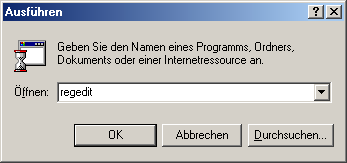
2. Hangeln Sie sich nacheinander durch die Windows Registrierungs Pfade HKEY_LOCAL_MACHINE\System\CurrentControlSet\Services\Class\fdc\0000 und klicken Sie mit der rechten Maustaste ins rechte Teilfenster.

3. Now select New > String. Now name your newly created value ForceFIFO and confirm this. Double-click on it and enter a 0 in the line that appears.
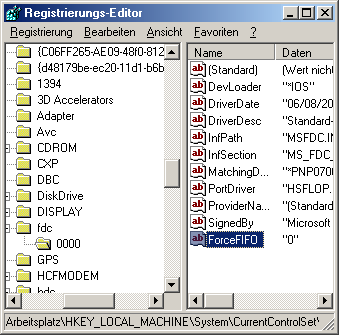
After a restart, you will notice an increase in the data rate and faster accesses on your floppy disk drive.

NOTE FOR NEW PUBLICATION:This article was produced by Sandro Villinger and comes from the Windows Tweaks archive, which has been built up since the late 1990s.

Founded Windows Tweaks as a teenager in 2001, his helpful PC tricks made it Germany's most visited Windows site (at the time Sandro looked like this). He then went on to write for international publications such as PC-Praxis, Computerbild, PCWorld in the USA, IMTEST.de and Hifi.de. Sandro's main job is as Global Product Marketing Lead and Consultant for various global tech companies, including Microsoft, AVG, Avast, Nero, TeamViewer, Swiss IT Security Group and now currently in the fintech sector for Gendigital. But he can't get rid of his passion and shares his tweaks here again. Privately, he enjoys traveling the world and loves Asia, especially Japan, Singapore and Korea, but also natural places like Iceland and the Nordics. You can reach Sandro via e-mail.

Leave a Reply

Your email address will not be published. Required fields are marked *

Windows Tweaks Logo Microsoft PC Help - 09 white 120
by Real Tech Experts
Save time and stress with expert knowledge about software, hardware, AI & Microsoft. 
Windows Tweaks Microsoft PC Help - SINCE 1998 - retina 2

Time-saving tips for PCs, laptops, Windows & software?

Subscribe to our newsletter and receive only our best guides & tweaks as well as exclusive tips for our subscribers. 
Newsletter-Form
Unsubscribe at any time. Approximately 1 - 2 emails per month. This consent includes information on revocation, shipping service provider, and statistics according to our Privacy Policy.
© 1998 - 2025 Windows-Tweaks.info
Made in Germany with ❤️ 
For all technology users around the globe.
This website runs on 🌳 GREEN energy
crossmenu
