
Windows Tweaks Logo Microsoft PC-Hilfe - 02 blue red
Windows Tweaks Logo Microsoft PC Help - 09 white 120

Windows 98 - Defragment the hard disk faster and more efficiently

November 25, 2013
Updated: December 6, 2021
Quick overview:

Slumps in speed, slower execution of programs and instabilities. These are all signs of the constant fragmentation of a hard disk. Most users don't pay attention to this factor and often rely on new hardware, which in turn means a deep dive into their wallets.

You can expect performance losses of up to 50% with a heavily fragmented hard disk, which makes it almost impossible to work efficiently. Windows 98 offers an integrated defragmentation program which, however, does not work very accurately or quickly. The same application is also available in the successor Windows Me, but it is much more efficient and faster. It is actually possible to use the new defragmentation with the old Windows 98.

Defragment hard disk faster and more efficiently

1. Get the file defrag.exe from a researcher with Windows Millennium (from acquaintances or Internet friends), which is located in the Windows folder.
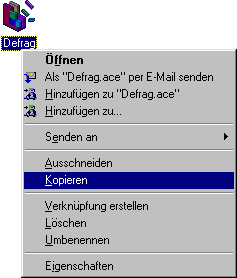
2. Use this new defragmentation file to overwrite the old one in your Windows folder of Windows 98.
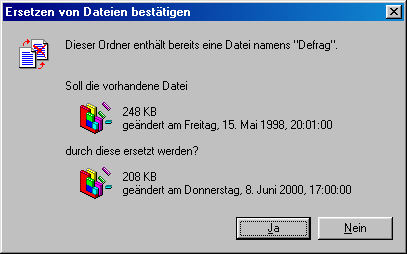
I am probably not allowed to offer the Windows Me Defrag.exe for download for legal reasons, which is why you have to help yourself or search for the file via www.google.de. From now on you can look forward to a speedy defragmentation.

NOTE FOR NEW PUBLICATION: This article was produced by Sandro Villinger and comes from the Windows Tweaks archive, which has been built up since the late 1990s.

Founded Windows Tweaks as a teenager in 2001, his helpful PC tricks made it Germany's most visited Windows site (at the time Sandro looked like this). He then went on to write for international publications such as PC-Praxis, Computerbild, PCWorld in the USA, IMTEST.de and Hifi.de. Sandro's main job is as Global Product Marketing Lead and Consultant for various global tech companies, including Microsoft, AVG, Avast, Nero, TeamViewer, Swiss IT Security Group and now currently in the fintech sector for Gendigital. But he can't get rid of his passion and shares his tweaks here again. Privately, he enjoys traveling the world and loves Asia, especially Japan, Singapore and Korea, but also natural places like Iceland and the Nordics. You can reach Sandro via e-mail.

Leave a Reply

Your email address will not be published. Required fields are marked *

Windows Tweaks Logo Microsoft PC Help - 09 white 120
by Real Tech Experts
Save time and stress with expert knowledge about software, hardware, AI & Microsoft. 
Windows Tweaks Microsoft PC Help - SINCE 1998 - retina 2

Time-saving tips for PCs, laptops, Windows & software?

Subscribe to our newsletter and receive only our best guides & tweaks as well as exclusive tips for our subscribers. 
Newsletter-Form
Unsubscribe at any time. Approximately 1 - 2 emails per month. This consent includes information on revocation, shipping service provider, and statistics according to our Privacy Policy.
© 1998 - 2025 Windows-Tweaks.info
Made in Germany with ❤️ 
For all technology users around the globe.
This website runs on 🌳 GREEN energy
crossmenu
