
Windows Tweaks Logo Microsoft PC-Hilfe - 02 blue red
Windows Tweaks Logo Microsoft PC Help - 09 white 120

Windows XP - Sensational pictures for the first look at the new Windows

Updated: April 14, 2022
Published: January 29, 2013
Quick overview:

Are you about to install Windows XP (codename: Whistler) on your hard disk and still hesitating? Here are some pictures that will get you in the right mood for the upcoming installation and also provide a high level of information.
WinXP 7WinXP 7
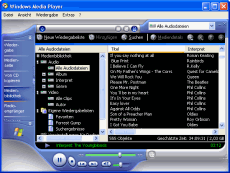
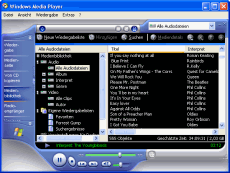
The playlist of the new Windows Media Player 8.0 is very clearly laid out and user-friendly.

WinXP 8WinXP 8
The defragmentation program, which is a revised version of the Windows 2000 program, is far superior to the Windows 98/Me Defragger and much more efficient.
WinXP 9
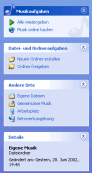
Die neuen Aufgaben in den Ordnern machen das Leben für Musik und Bilderfans wesentlich leichter. Auch die Möglichkeit hierüber Musik zu kaufen ist faszinierend einfach.

WinXP 10WinXP 10
The control panel is divided into categories if desired. Fortunately, this feature can also be switched off...

In case you have now seen enough and finally want to proceed with the installation: Windows XP Professional - Easy and understandable step-by-step installation guide

We also offer you an alternative with the installation of two parallel operating systems: Set up a Windows 9x/Me/2000 and Windows XP dual boot.

NOTE FOR NEW PUBLICATION: This article was produced by Sandro Villinger and comes from the Windows Tweaks archive, which has been built up since the late 1990s.

Founded Windows Tweaks as a teenager in 2001, his helpful PC tricks made it Germany's most visited Windows site (at the time Sandro looked like this). He then went on to write for international publications such as PC-Praxis, Computerbild, PCWorld in the USA, IMTEST.de and Hifi.de. Sandro's main job is as Global Product Marketing Lead and Consultant for various global tech companies, including Microsoft, AVG, Avast, Nero, TeamViewer, Swiss IT Security Group and now currently in the fintech sector for Gendigital. But he can't get rid of his passion and shares his tweaks here again. Privately, he enjoys traveling the world and loves Asia, especially Japan, Singapore and Korea, but also natural places like Iceland and the Nordics. You can reach Sandro via e-mail.

Leave a Reply

Your email address will not be published. Required fields are marked *

Windows Tweaks Logo Microsoft PC Help - 09 white 120
by Real Tech Experts
Save time and stress with expert knowledge about software, hardware, AI & Microsoft. 
Windows Tweaks Microsoft PC Help - SINCE 1998 - retina 2

Time-saving tips for PCs, laptops, Windows & software?

Subscribe to our newsletter and receive only our best guides & tweaks as well as exclusive tips for our subscribers. 
Newsletter-Form
Unsubscribe at any time. Approximately 1 - 2 emails per month. This consent includes information on revocation, shipping service provider, and statistics according to our Privacy Policy.
© 1998 - 2025 Windows-Tweaks.info
Made in Germany with ❤️ 
For all technology users around the globe.
This website runs on 🌳 GREEN energy
crossmenu
