


Quick overview:
The many advantages of security and speed also come with a small disadvantage. Reading and writing data is slightly slowed down by the support for Windows 3.1/DOS file names, which only consist of 8 letters. You can safely take off this inhibitor if you are not using such an operating system on the side or are not a member of a network with Windows 3.1/DOS computers. And this is how it works:
(Note the warning below before you start)
1. Click on Start and select Run. A window will immediately open in whose command line you type regedit and confirm with Ok.
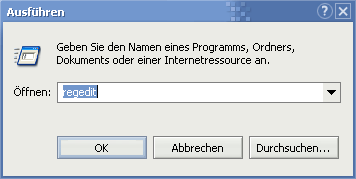
2. The Windows registry opens. Work your way through the following keys step by step: HKEY_LOCAL_MACHINE\SYSTEM\ CurrentControlSet\Control\FileSystem.
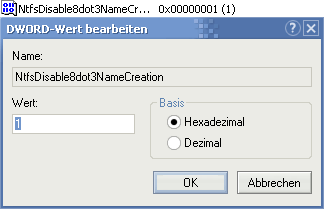
3. Double-click NtfsDisable8Dot3NameCreation in the right-hand pane and enter 1 in the command line that appears.
Now confirm with Ok and restart your computer for the changes to take effect.
Warning I: We have noticed that some users are complaining about difficulties with DOS programs, resulting in the following error messages:
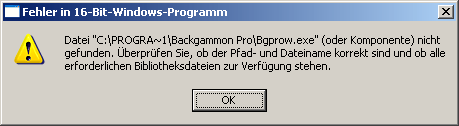
If you still often use very old programs that use the old file notation, we strongly advise against this tweak, as it can no longer be undone.
This error message is particularly serious if you try to install the Via4in1 driver, which takes over the configuration for the hard disk controller and mainboard control. I received interesting information about this topic by e-mail (from Mr. Blei): If you install the corresponding program in a directory that is based on 8+3 (e.g. C:\Prog\VIA\setup.exe), the installation can be carried out smoothly. This was confirmed in a test.
Update problems with Norton AntiVirus 2004 have also been reported occasionally: If NAV is installed with deactivated 8+3 file names (value 1), the setup runs smoothly, whereby the program update (not the virus definition update) is later no longer operational. Even the temporary activation of these file names no longer helps (value 0). The solution is a complete reinstallation with 8+3 file names switched on (restart required). Pay attention to this during installation! Afterwards, it does not matter whether 0 or 1, because the update will then work in both cases.
Many thanks for the NAV hint to Mr. Orlowski, who took the great trouble to test this symptom and provided me with the results by e-mail.
Warning II: Thanks to a letter from Mr. Kaltenecker, I found out that some shared objects via network are no longer displayed after deactivating the 3.1 file names. So if you have problems finding network folders and files, we recommend that you do not use this setting.

On Windows Tweaks you will find time-saving tech guides for PC, software & Microsoft. For a stress-free digital everyday life. Already We have been tweaking Windows since 1998 and just don't stop!
