


Quick overview:
Bei jedem Windowsstart erscheint das Windows XP Logo. Da dies nicht nur eine Art Werbung ist sondern dies auch den Windowsstart um ca. eine Sekunde verzögert können sie dieses lästige Bild getrost abschalten. So gehen sie dabei vor:
Instructions for deactivating the Windows XP logo
1. Open My Computer and click on Extras > Folder options > View in the toolbar and remove the checkmark next to Hide protected system files (recommended). Confirm the message with OK.
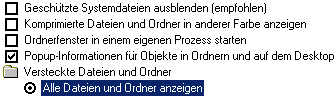
2. Now use the scroll bar to move further down and activate the option AShow all files and folders. Click on OK. Now double-click on drive C:\ (or on the drive where your Windows is installed) and open the file Boot.ini. Now look for the line (it may differ slightly from this one):

[operating systems]
multi(0)disk(0)rdisk(0)partition(2)\WINXP="Microsoft Windows XP Professional" /fastdetect
Enter the parameter /fastdetect after the /noguiboot. Save the file and restart. After a restart, the boot logo will no longer appear.
3. Sie kommen auch leichter an die Boot.ini, indem Sie auf Start/Ausführen klicken und hier msconfig eintragen. Hier wechseln Sie in die Registerkarte Boot.ini und markieren Ihren Windows XP Eintrag. Sobald Sie nun auf /noguiboot und auf OK geklickt haben, ist das Bootlogo verschwunden.
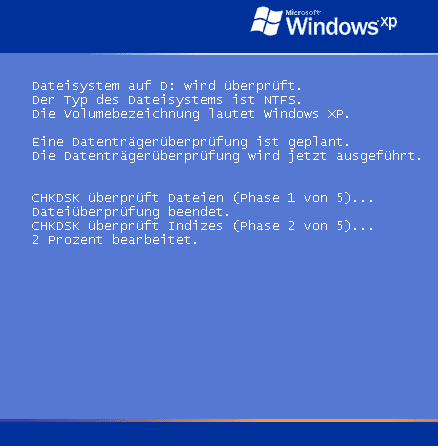
Note: As soon as this tip is applied, boot applications such as CheckDsk, PartitionMagic, Diskeeper, O&O Defrag and others will no longer be able to display their status messages.
NOTE FOR NEW PUBLICATION: This article was produced by Sandro Villinger and comes from the Windows Tweaks archive, which has been built up since the late 1990s.

On Windows Tweaks you will find time-saving tech guides for PC, software & Microsoft. For a stress-free digital everyday life. Already We have been tweaking Windows since 1998 and just don't stop!
