


Quick overview:
Die neuartige DSL (Digital Subscriber Line) ermöglicht blitzschnelle Datenübertragung im Internet. Live Übertragungen, großen Downloads und umfangreicher Musik steht nichts mehr im Wege - sie bietet zu anderen Internetverbindungen eine bis zu vielfach höhere Geschwindigkeit. Der blitzschnelle Aufbau von Internetseiten ermöglicht das rapide Auffinden von Informationen. Falls Sie einen DSL Anschluss mit Modem haben können Sie diesen ganz leich unter Windows 2000 einrichten.
Robert Schlabbach has written special drivers for this purpose, which usually work faster and without problems than the device drivers from Telekom or another DSL provider. Unfortunately, the installation is somewhat more complicated than with the simple installation programs, e.g. for T-DSL. We will guide you step by step through the simple installation process:
1. Klicken Sie hier, um sich von der Seite von Robert Schlabbach die RasPPPoE Treiber herunterzuladen. Diese sind meist in gepackter Form, weshalb ich ihnen WinAce empfehle, welches mühelos alle Sorten von komprimierten Dateien extrahiert. Hier klicken um herauszufinden, wie Sie an WinAce herankommen.
2. Gehen Sie in die Systemsteuerung und doppelklicken Sie auf das Symbol Netzwerk- und DFÜ Verbindung.

3. Klicken Sie nun auf LAN Verbindung mit der rechten Maustaste und wählen Sie Eigenschaften. Klicken Sie jetzt auf Installieren und dann nacheinander auf Protokoll > Hinzufügen.
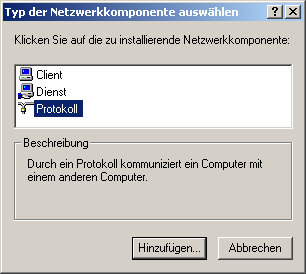
4. Wählen Sie jetzt Datenträger sobald die Liste erscheint und navigieren Sie über die Schaltfläche Durchsuchen zu ihren RasPPPoE Treibern, die Sie wie oben beschrieben entpackt haben. Sobald diese gefunden wurden und Sie doppelt draufklicken erscheint ein neues Fenster in welchem Sie bestätigen müssen, dass das Protokoll das richtige ist.
5. Es erscheinen nun einige Fenster zur Treiberbestätigung, die Sie alle mit Ja installieren lassen. Nachdem Sie neugestartet haben sind ihre DSL Treiber installiert und Sie können sich dem Schritt Endlich ins Internet einwählen widmen.
NOTE FOR NEW PUBLICATION: This article was produced by Sandro Villinger and comes from the Windows Tweaks archive, which has been built up since the late 1990s.

On Windows Tweaks you will find time-saving tech guides for PC, software & Microsoft. For a stress-free digital everyday life. Already We have been tweaking Windows since 1998 and just don't stop!
