


Quick overview:
Office applications, drivers, virus scanners, download managers or annoying auxiliary programs. They all have one thing in common: nesting in the autostart. This means that they load automatically every time Windows boots up, which can significantly delay system startup and also reduce performance reserves.
A virus scanner usually consumes so many resources that it is hardly possible to work properly. Many problems also arise from the many programs loading, which is why it is advisable to free the system from all unnecessary autostart ballast.
Deactivating hidden autostart programs - this is how you proceed
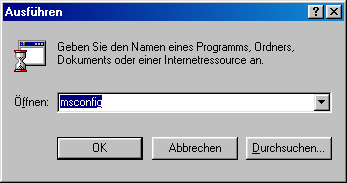
1. Click on Start/Run and type msconfig in the command line.
2. Now switch to the Autostart tab and uncheck all unimportant programs that you do not need at system startup. Most of the programs can then be loaded individually later, so that your system always remains clean and fast.
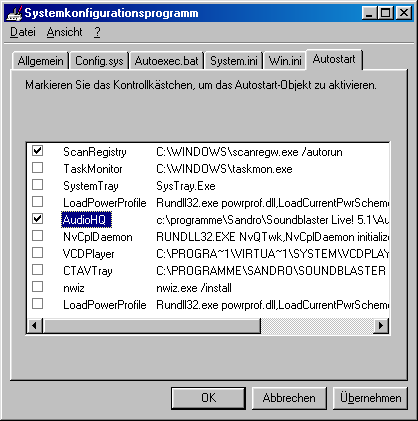
3. After the required restart (if you have clicked OK), you will notice that your system is ready to work more quickly and that Windows is much faster and more stable. However, I strongly recommend that you leave the ScanRegistry entry activated, as this reduces and optimizes the Windows registry data bank.
Important note msconfig
In many cases, not even msconfig can detect all autostart entries, which is why they cannot be removed. I therefore advise you to search the registry for programs that start automatically! This way you can also remove stubborn, hidden entries such as the Audigy 2 sound card welcome video, dialers, viruses or other embedded tools, which not only helps to speed up system startup and free up resources, but can also ensure system security. Click here:
- Deactivate the hidden autostart programs (Windows 2000)
Since Windows 2000 does not have msconfig, I only offered the method via the registry, which I now also recommend for Windows 98 and all other operating systems.
NOTE FOR NEW PUBLICATION: This article was produced by Sandro Villinger and comes from the Windows Tweaks archive, which has been built up since the late 1990s.

On Windows Tweaks you will find time-saving tech guides for PC, software & Microsoft. For a stress-free digital everyday life. Already We have been tweaking Windows since 1998 and just don't stop!
