
Windows Tweaks Logo Microsoft PC-Hilfe - 02 blue red
Windows Tweaks Logo Microsoft PC Help - 09 white 120

Windows Vista - Using Aero Glass

November 29, 2013
Updated: December 6, 2021
Quick overview:

Aero Glass is more than just a description of the new 3D effects or animations that Microsoft has built into the new Windows Vista operating system. Windows-Tweaks introduces you to some useful features that you can use with the Aero Glass interface.
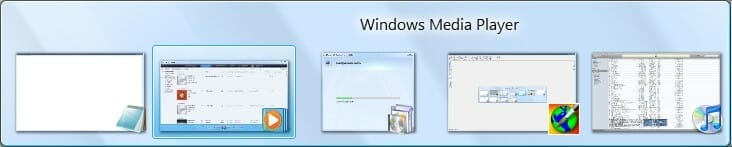
Windows_Vista-02Windows_Vista-02
Windows Flip: quick preview

Now press the "Windows key" and "Tab" simultaneously to view the Flip3D view. Windows Vista presents all currently visible windows in a three-dimensional row. Hold down the "Windows key" and use "Alt" to switch through the individual windows of Flip and Flip3D. With Flip3D you can also use the mouse wheel for navigation.
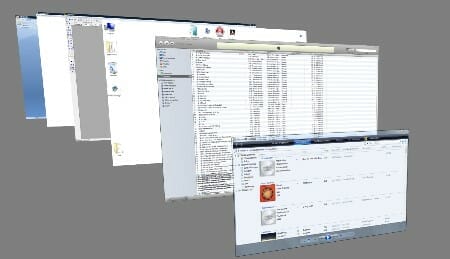
Windows_Vista-03_Small

Flip3D: Scroll through all open windows

With Windows Vista Aero Glass, you can find out much more easily what is hidden behind a taskbar element. Simply move the mouse over an element and you get a so-called thumbnail view!
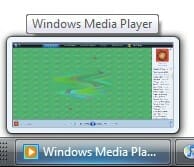
Windows_Vista-04

Window preview (thumbnail view)

Aero Glass is not just a new look - the new graphics technologies have been put to good use by Microsoft! Although some features require some getting used to (e.g. Flip3D), you shouldn't miss out on this advantage...

NOTE FOR NEW PUBLICATION: This article was produced by Sandro Villinger and comes from the Windows Tweaks archive, which has been built up since the late 1990s.

Founded Windows Tweaks as a teenager in 2001, his helpful PC tricks made it Germany's most visited Windows site (at the time Sandro looked like this). He then went on to write for international publications such as PC-Praxis, Computerbild, PCWorld in the USA, IMTEST.de and Hifi.de. Sandro's main job is as Global Product Marketing Lead and Consultant for various global tech companies, including Microsoft, AVG, Avast, Nero, TeamViewer, Swiss IT Security Group and now currently in the fintech sector for Gendigital. But he can't get rid of his passion and shares his tweaks here again. Privately, he enjoys traveling the world and loves Asia, especially Japan, Singapore and Korea, but also natural places like Iceland and the Nordics. You can reach Sandro via e-mail.

Leave a Reply

Your email address will not be published. Required fields are marked *

Windows Tweaks Logo Microsoft PC Help - 09 white 120
by Real Tech Experts
Save time and stress with expert knowledge about software, hardware, AI & Microsoft. 
Windows Tweaks Microsoft PC Help - SINCE 1998 - retina 2

Time-saving tips for PCs, laptops, Windows & software?

Subscribe to our newsletter and receive only our best guides & tweaks as well as exclusive tips for our subscribers. 
Newsletter-Form
Unsubscribe at any time. Approximately 1 - 2 emails per month. This consent includes information on revocation, shipping service provider, and statistics according to our Privacy Policy.
© 1998 - 2025 Windows-Tweaks.info
Made in Germany with ❤️ 
For all technology users around the globe.
This website runs on 🌳 GREEN energy
crossmenu
